
Your website is the center of your digital marketing world — the place that all digital rivers run toward. The largest of its traffic sources is generally organic search. SEO is necessary to ensure you are ranked well on a search engine.
Yet all too often, businesses don’t think about SEO until after having a website designed (or redesigned), and these sites are often sadly lacking on the SEO and digital marketing front. They may look shiny, but if the marketing smarts are not cooked in at design time, then you will be running the marketing race with a wooden leg. Or at the very least, faced with going back to the drawing board and wasting a whole load of time and money.
In this post, we look at how SEO should be an integral part of your website design (or redesign) process. We are going to look at what you need to consider to have a site that is built for search marketing and lead generation — and how focusing on happy users keeps the Google gods on your side.
We will also take a look at some of the common pitfalls that can befall businesses looking to build a new website that is central to your digital marketing efforts.
In brief, I am going to help you ensure your next site is a lean, mean SEO and digital marketing machine.
Developing an SEO-friendly website
At a fundamental level, an SEO-friendly site is one that allows a search engine to explore and read pages across the site. Ensuring a search engine can easily crawl and understand your content is the first step to ensuring your visibility in the search engine result pages.
A search engine utilizes a web crawler for this task, and we are trying to work with the search engines rather than against them. Unfortunately, there are many ways to make a website, and not all technologies are built with search engine optimization in mind.
Building an SEO-friendly site requires careful planning and a structured approach to representing your business and the services you provide. For many businesses, this can be complicated — it’s not always easy to document exactly what you do.
As a marketing tool, your website should be built upon a solid digital marketing plan with a clear business model and value proposition. If that’s unclear, then you need to revisit that first.
Assuming you have all that good stuff in place, let’s dive in.
Fundamentals
There are a few core elements that set the stage for a well-optimized website design process.
Domains
Your business may use example.com as the primary domain. You may have others. Ensuring your domain makes sense and relates to what you do is super-important. Ensuring that all variations and subdomains correctly point at the main site and redirect to a single canonical version of the site is important.
Our business is called TurkReno. We operate in the United States. We are a web-based business. It naturally follows that our domain is turkreno.com. All subdomains 301 redirect back to the main URL turkreno.com. We have few domain variations that 301 redirect back to the main URL. This all makes sense.
Don’t be fooled into thinking that having-my-keywords-in-my-domain.com helps. It just looks daft. It can help a little for local businesses, but ensure you are mapping to the real world. Be sensible.
Hosting
Your hosting is also important. A slow site makes for unhappy users. Your hosting should follow common-sense rules. Be situated where your audience is situated. Fast. Platform-specific, if necessary. We have a great hosting platform.
CMS
The CMS (content management system) you choose for your business can hugely influence how successful you are. WordPress is a great option in many situations, but it’s not the only one. It certainly is wired up at a basic level in a way that Google can understand. This is not to say it is the best choice for all situations, but certainly, it’s a good starting point for most businesses. Just be sure that the CMS you choose is the right one for your situation, rather than the one your chosen web company prefers to work with.
Crawling & accessibility
The first step is ensuring a search engine can crawl your site and understand what it is that you do (and where you do it).
Indexation
To understand your site, they have to be able to read the content of the page. This means that the main content of your site should be text-based behind the scenes. Not images. Not flash or video. Even in this ever-advancing world, your main content should still be text-based. There are some great tools, like web fonts, that mean you can still look the part, and your images have a place, but be sure to talk in clear language about what it is you do so the search engine can read and understand your offering.
Images, videos, PDFs and content are also important and can be a source of search engine traffic. Again, these need to be discoverable and indexable.
Link structure
To index your content beyond the home page, you need internal links that the search engine can crawl. Your primary navigation, search engine directives and tools like XML sitemaps all help the search engine crawl your site and discover new pages. Tools like Screaming Frog can help you ensure that your site can be easily crawled by a search engine.
Information architecture and structuring your site
I have always like the filing cabinet analogy for website structure. Your site is the filing cabinet. The major categories are the drawers. The subcategories are the folders in the drawers. The pages are documents in the folders.
- Cabinet: your website
- Drawer: high-level category
- Folder: subcategory
- File: individual document/page
Context is indicated not only by the site it exists on but also by the position within that site. Our own site has a drawer for services, and each service has sub-services in folders. Your site will be largely the same.
If we consider the following structure of the Bowler Hat site as an example:
Home
– Services
– – Service Area
– – – Individual Service
Home
– Services
– – SEO
– – – SEO Audits
So, there is a page in this information architecture that is simply /audits/.
The /audits/ page exists in the SEO folder in the services drawer. Nice and organized. This can follow through with other SEO elements to clearly indicate context far beyond that which can be indicated by the document alone.
This is relevant to blog posts, articles, FAQ content, services, locations and just about anything else that is an entity within your business. You are looking to structure the information about your business in a way that makes it understandable.
Some sites may take a deep approach to structuring content. Others may take a wide approach. The important takeaway here is that things should be organized in a way that makes sense and simplifies navigation and discovery.
A three- to four-level approach like this ensures that most content can be easily navigated to within four clicks and tends to work better than a deeper approach to site navigation (for users and search engines).
URLs
Context is further indicated by the URL. A sensible naming convention helps provide yet more context for humans and search engines.
Following are two hypothetical sets of URLs that could map to the Services > SEO > SEO Audit path laid out above — yet one makes sense, and the other does nothing to help.
www.example.com
www.example.com/services/
www.example.com/services/seo/
www.example.com/services/seo/audits/
www.example.com
www.example.com/s123/
www.example.com/s123/s1/
www.example.com/s123/s1/75/
Of course, the second set of URLs is a purposely daft example, but it serves a point — the first URL naming convention helps both search engines and users, and the second one hinders.
Navigation
Your navigation is equally important. When a site is well-structured, the navigation works with the structure, the URLs and other components, like XML sitemaps, to help solidify what each page or piece of content is about.
Navigation is more than just the menu at the top of your website. It is how you signpost users to the most relevant part of your site. Navigation can be a tool to raise awareness of additional services and includes not just text links but content on all pages and in the templated design elements of your site.
I have always liked the signpost analogy. I walk into a supermarket and look for the signs to find what I need. Your website is no different. If a user is referred and searches for your brand name, then they will land on your home page. They then need a signpost to get them to the relevant service. And it had better be easy to find!
It is very easy to get this wrong, and careful thought must be applied — before you build the site — regarding the needs and wants of your users. A website is a digital component that should execute the strategy from your marketing plan. Understanding users here is crucial so you can ensure you are meeting their needs.
Navigation should not need any real cognition — it should not make the user have to think. The following image is a sign from my local home improvement store. Which direction takes you to the car park and which direction takes you to the deliveries entrance?
My brain follows the “customer parking” line from left to right, so I of course turn right. However, the customer parking is to the left. There is nothing there to clearly illustrate which is right or wrong.
I have to think. Or in practice, I go in the wrong direction a few times before I learn. However, if users don’t find what they are looking for on a website, they will return to the great ocean of competition that Google search results represent.
Ensure your navigation is crystal-clear — if one user can make a mistake, many others can, too.
Common problems
There are many potential issues with content that can’t be found or can’t be understood by the search engine that can work against you. For example:
- Orphaned content that can’t be found
- Content only available via site search
- Flash files, Java programs, audio files, video files
- AJAX* and flashy site effects**
- Frames — Content embedded from another site can be problematic.
- Subdomains — content split into subdomains rather than sub-folders
* Google has gotten a lot better at reading AJAX pages, but it is still possible to obscure content with pointless effects.
** Flash is going to be retired by December 2020.
Be sure that important content is easily discoverable, understandable and sits in the overall structure of the site in a way that makes sense.
Summary
If everything is done well, a human and a search engine should have a pretty good idea what a page is about before they even look at it. Your typical SEO then just builds on this solid foundation that is laid out by your information architecture and site structure.
Mobile-friendly design
We live in a mobile-first age. Sites optimized for search engines should give equal consideration to the mobile layouts of their websites (rather than just bolting on simple responsive website design).
Yet, in 2017, responsive design is not enough. Five years later, with massive technological progress and greatly improved mobile data networks, your future customers are using mobile as the first, and often only, device to interact with your business.
To create a truly mobile-friendly design and maximize results from mobile search, you must think of the needs and wants of mobile users. What a user will do on a phone is often far different from what they will do on a computer. And even if your conversions tend to be on a desktop, that crucial first touch may well be on mobile.
From an SEO perspective, it is worth noting that mobile-friendliness is a confirmed ranking factor for mobile search. However, far more important, mobile is how your prospective customers are searching for and browsing your site.
Work hard on optimizing the user experience for mobile users and you will reap the rewards for your efforts in terms of traffic and user engagement.
Page speed
Another key consideration in the mobile era is page speed. Users may be impatient, or they may not always have a great mobile data connection. Ensuring your pages are lean and mean is a key consideration in modern SEO-friendly website design.
A great starting point is Google’s mobile-friendly test. This tool will give you feedback on mobile-friendliness, mobile speed and desktop speed. It also wraps everything up into a handy little report detailing what exactly you can do to speed things up.
Suffice it to say, page speed is yet another important consideration that spans how your site is built and the quality and suitability of the hosting you use.
Usability
Web usability is a combination of other factors: device-specific design, page speed, design conventions and an intuitive approach to putting the site together with the end user in mind.
Key factors to consider include:
- Page layout. Important elements should have more prominence.
- Visual hierarchy. Make more important elements bigger!
- Home page and site navigation. Clearly signpost directions for users.
- Site search. Large sites need a sensibly positioned search option.
- Form entry. Make forms as lightweight and easy to fill as possible.
- Design. Great design makes everything easier.
This is just scratching the surface here, and usability really has to be customized to the individual site.
The content marketing funnel
Your website has a hell of a job to do: it must help your business get in front of prospective customers on search engines, and then it has to engage and convert those customers.
Your site needs content to help with all of these stages of the customer journey. Content and SEO is an important combination here, as you may get in front of a customer as they look for similar services from another company they are already considering.
A structured way to consider the content you need here is a typical marketing funnel:
Awareness — top of the funnel
Awareness content will typically be your blog and informational articles. We are helping your prospective customer understand the problems they face and illustrating your experience and credibility in solving them.
- Blog posts
- Informational articles
- Webinars
- Comprehensive guides
- FAQs
Consideration — middle of the funnel
The content at the consideration stage helps your prospect compare you against the other offerings out there. This tends to be practical content that helps the customer make a decision.
- Case studies
- Product or service information
- Product demonstration videos
- User guides
Conversion — bottom of the funnel
Bottom-of-the-funnel content drives conversions and should gently encourage a sale or lead.
- Reviews
- Testimonials
- Free trial
- Free consultation
Remember that customers will search across this entire spectrum of content types. Therefore, ensuring all of these areas are covered aids discovery via search engines, consideration and conversion.
SEO nuts & bolts
As you can see, there is a lot to consider before we even look at the more familiar elements of optimizing your site and pages. We should only really start to think about keywords and basic on-page optimization once we have this solid foundation in place. And hopefully, if we have structured everything correctly, then the actual optimization of the pages becomes far easier.
Keyword targeting
Nailing your keyword strategy is so much easier once you have a solid structure without internal duplication. If we look at our previous examples for site hierarchy and structure, then adding keywords is relatively straightforward (and is something we would often do in a spreadsheet pre-design).
– Services
– – SEO
– – – SEO Audits
www.example.com/services/
www.example.com/services/seo/
www.example.com/services/seo/audits/
If I use these pages as an example, we have a natural progression from broad keywords to more refined search terms. We can even consider basic modifiers such as location if we are a local business.
Home
– digital marketing agency
– digital marketing company
+ Mobile
+ AL
Services
– marketing services
– digital marketing services
+ Mobile
+ AL
SEO
– SEO
– Search Engine Optimization
+ Company
+ Agency
+ Mobile
+ AL
SEO Audits
– SEO Audits
– Technical SEO Audits
+ Agency
+ Company
+ Mobile
The point here is that a well-structured site gets you a good way toward determining your keyword strategy. You still have to do the research and copywriting, but you can be sure you have a solid strategy to target broad and more detailed terms.
HTML title tags
The <title> tag is the primary behind-the-scenes tag that can influence your search engine results. In fact, it is the only meta tag that actually influences position directly.
Best practice for title tags are as follows:
- Place keywords at the beginning of the tag.
- Keep length around 50 to 60 characters.
- Use keywords and key phrases in a natural manner.
- Use dividers to separate elements like category and brand.
- Focus on click-through and the end user.
- Have a consistent approach across the site.
Even in 2017, we still see a lot of overoptimized page titles. We want our keywords in the title tag, but not at the expense of click-through and human readability. A search engine may rank your content, but a human clicks on it, so keep that in mind.
Meta description tags
Meta descriptions don’t directly influence rankings. We all know that, right? But of course, that is completely missing the point here. Your meta description is the content of your advertisement for that page in a set of search engine results. Your meta description is what wins you the click. And winning those clicks can help improve visibility and is absolutely vital in driving more users to your pages.
Meta descriptions must:
- truthfully describe the page content.
- advertise the page and improve click-through rates.
- consider the user’s thought process and why they will click on this page.
- include keywords where relevant and natural to do so.
The search engine will highlight search terms in your page title and meta description which help a user scan the page. Don’t use this as an excuse to spam the meta description, though, or else Google likely will ignore it, and it won’t lead to that all-important click!
There are also situations where it can make sense not to create a meta description and let the search engine pull content from the page to form a description that more accurately maps to a user’s search. Your brief meta description can’t always cover all the options for a longer-form piece of content, so keep this in mind.
Heading tags
Heading tags help structure the page and indicate hierarchy in a document: H1, H2, H3 and so on. Text in heading tags correlates with improved rankings (albeit slightly), but what really matters is that alignment between the structure of the site, behind the scenes optimization like page titles and meta descriptions and the content itself. Line everything up, and things make more sense for users, and we help search engines categorize our content while eking out every last bit of simple, on-page optimization we can.
Remember to align header tags with the visual hierarchy. Meaning the most important header on the page (typically the <h1>) should also be the biggest text element on the page. You are making the document visually easy to understand here and further ensuring that design and content are working together for the best end result.
Page content
The content should generally be the most important part of the page. However, we still see archaic SEO practices like overt keyword density and search terms with a lack of connective words used in the copy. This does not work. It certainly does not help with your SEO. And it makes for a poor user experience.
We want to make sure the context of our page is clear. Our navigation, URLs, page titles, headers and so on should all help here. Yet we want to write naturally, using synonyms and natural language.
Focus on creating great content that engages the user. Be mindful of keywords, but certainly don’t overdo it.
Considerations for page content:
- Keywords in content (but don’t overdo it)
- Structure of the page
- Position of keywords in the content — earlier can be better
- Synonyms and alternatives
- Co-occurrence of keywords — what else would other high-quality documents include?
Rich snippets
Rich snippets are a powerful tool to increase click-through rates. We are naturally attracted to listings that stand out in the search engine results. Anything you can do to improve the click-through rate drives more users and makes your search engine listings work harder. Factor in possible ranking improvements from increased engagement, and you can have a low-input, high-output SEO tactic.
The snippets that are most relevant to your business will depend on what you do, but schema.org is a great place to start.
Image optimization
Image SEO can drive a substantial amount of traffic in the right circumstances. And again, our thoughts regarding context are important here. Google does not (yet) use the content of images, so context within the site and the page and basic optimization are crucial here.
As an example, I am looking for a hobbit hole playhouse for my five-year-old, and the search brings up image results:
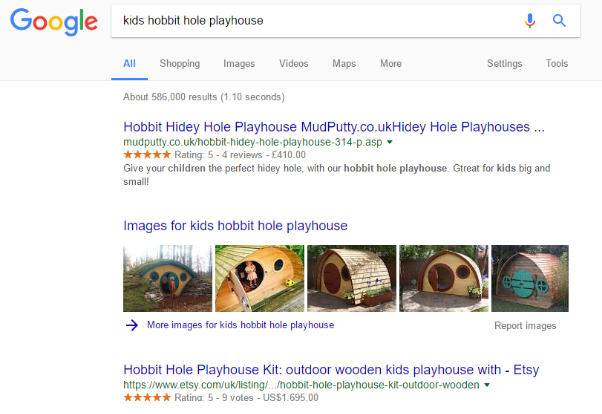
I can dive right into those image results and find a multitude of options, then use the image to drive me to the site that sells the playhouse. Optimizing your images increases the chance of improving prominence in the image search results.
Image optimization is technically straightforward:
- Image name — provide a name that clearly describes what the image is.
- Alt text — use descriptive alt text to help those who can’t see the images to reinforce the image content.
- Add OpenGraph and Twitter Cards so the image is used in social shares.
- Use the image at the right physical size to ensure fast downloads.
- Optimize the image’s file size to improve loading times.
- Consider adding images to your XML sitemap.
Image optimization is relatively simple. Keep the images relevant. Don’t spam the filenames and alt text with keywords. Be descriptive.
Common problems
SEO projects at Bowler Hat often include an SEO audit as the first port of call. We can’t cover every eventuality here, but the following are the usual suspects that crop up and that web designers should be mindful of.
Duplicate content
There tend to be two kinds of duplicate content: true duplicates and near-duplicates. True duplicates are where the content exists in multiple places (different pages, sites, subdomains and so on). Near-duplicates can be thin content or substantially similar content — think of a business with multiple locations or shoes listed on a unique page in different sizes.
Keyword cannibalization
Keyword cannibalization refers to the situation where multiple pages target the same keywords. This can impact the ability of your site to have one page that strongly targets a given term.
Where the site architecture and hierarchy has been carefully planned, you should eliminate this during the planning and design stages.
Domains, subdomains and protocols
Another potential issue where duplication crops up is where the site is available on multiple domains, subdomains and protocols.
Consider a business with two domains:
- Example.com
- Example.co.uk
With www and non-www versions:
- Example.com
- Example.co.uk
- www.example.com
- www.example.co.uk
And the site runs on HTTP and HTTPS:
- http://example.com
- http://example.co.uk
- http://www.example.com
- http://www.example.co.uk
- https://example.com
- https://example.co.uk
- https://www.example.com
- https://www.example.co.uk
Before too long, we can get to a situation where the site has eight potential variations. Factor in the site resolving on any subdomain and a few duff internal links and we can often add things like “ww.example.com” to the list above.
These kinds of issues are simply resolved with URL redirections via Apache, but again, they deserve consideration by any web design agency that takes care of hosting and is serious about the SEO of their customers’ websites.
Botched canonical URLs
Another common issue we see is an incorrect implementation of canonical URLs. What typically happens here is that the person building the site looks at canonical URLs as an SEO checklist kind of job. They are implemented by dynamically inserting the URL in the address bar into the canonical URL.
This is fundamentally flawed in that we can end up with the site running on multiple URLs, each with a canonical URL claiming that they are the authoritative version. So the canonical implementation exacerbates rather than resolves the issue.
Canonical URLs are a powerful tool when wielded wisely, yet they must be used properly or they can make matters worse.


